
To write a good ChatGPT prompt, tell it what you want done, give it the background it cannot guess, say what the answer should look like, and set the limits. That one habit fixes most disappointing results. OpenAI’s own prompt engineering guide and Anthropic’s prompting best practices agree on the basics: be clear, show examples, and separate your instructions from your material.
Below is a formula you can reuse, three before-and-after examples, and a table of the most common problems with their fixes.
The 5-part prompt formula
Table of Contents
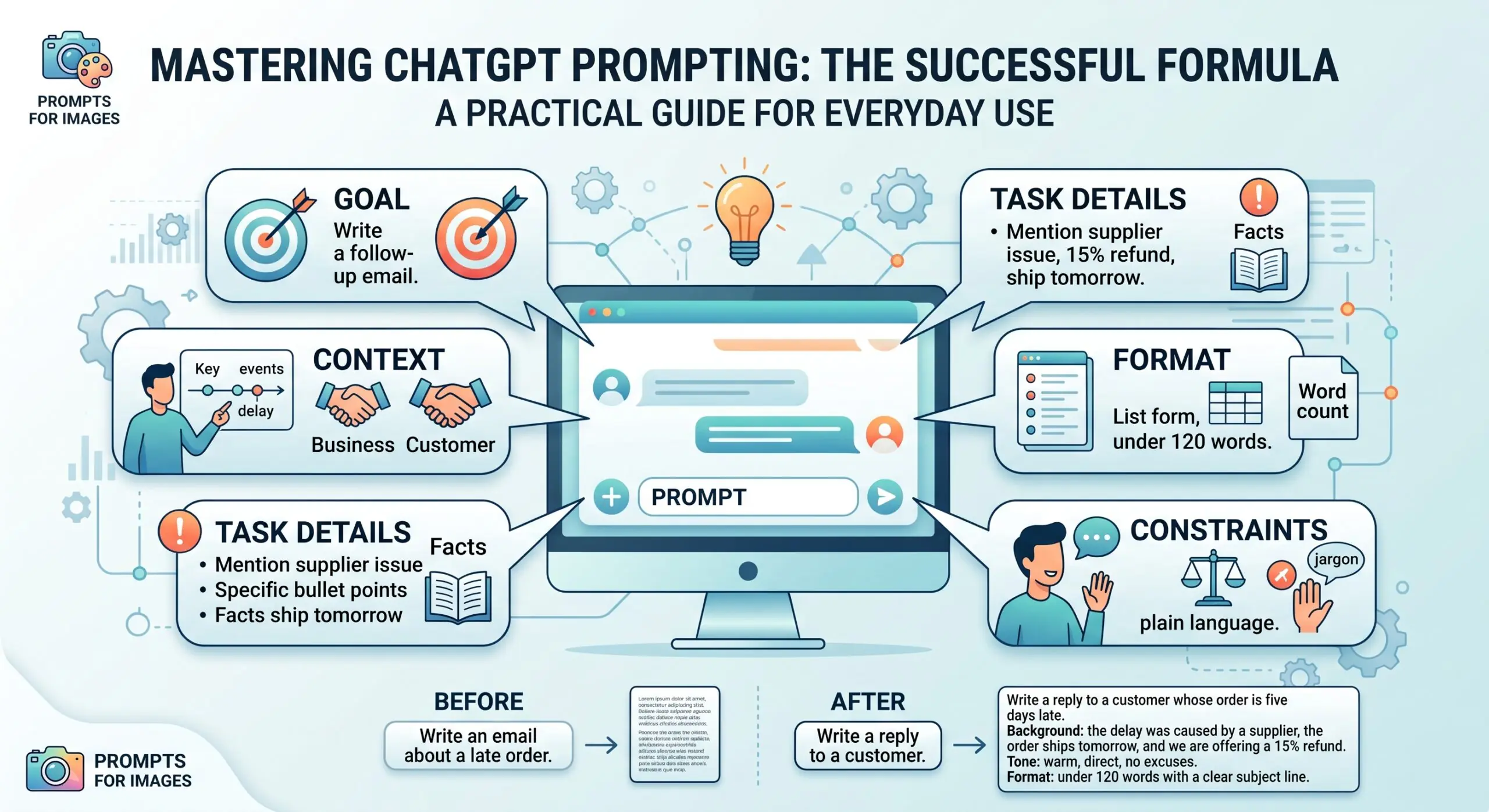
- Goal. What do you need? “Write a follow-up email” beats “help with email.”
- Context. Who is it for, what happened before, what do you already know? The model cannot see your situation unless you describe it.
- Task details. The specific points to cover, the facts to use, the thing to avoid.
- Format. Bullet list, table, three short paragraphs, 120 words, plain language.
- Constraints. Tone, reading level, what to leave out, and what to do when it is unsure.
A reusable template:
I need [goal]. Background: [context]. Please cover [details]. Format: [format]. Constraints: [tone, length, things to avoid]. If you are missing information, ask me questions before you answer.
Three before-and-after examples
1. A customer email
Weak: “Write an email about a late order.”
Stronger: “Write a reply to a customer whose order is five days late. Background: the delay was caused by a supplier, the order ships tomorrow, and we are offering a 15% refund. Tone: warm, direct, no excuses. Format: under 120 words with a clear subject line.”
2. Summarizing a document
Weak: “Summarize this.”
Stronger: “Summarize the report below for a busy manager. Give me the three decisions it asks for, the deadline for each, and any risk the author flags. Use bullets and do not add anything that is not in the text.” Then paste the report under a clear label, such as “REPORT:”.
3. Planning something
Weak: “Make me a study plan.”
Stronger: “I have six weeks and about five hours a week to prepare for an entry-level data analysis interview. I already know basic Excel but not SQL. Build a week-by-week plan with one practice task per week. Ask me any questions you need first.”
Techniques that make a real difference
- Show an example. Providing one or two samples of the output you want teaches style and structure faster than describing them. OpenAI calls this few-shot prompting.
- Separate instructions from material. Put pasted text under a label or inside tags so the model does not confuse your content with your instructions.
- Paste the source instead of asking from memory. If accuracy matters, give the model the text and tell it to use only that.
- Match the style of model. OpenAI’s guidance says reasoning models do well with a high-level goal, while standard GPT models do better with precise instructions.
- Iterate. Treat the first answer as a draft. Reply with “shorter,” “more specific to small businesses,” or “remove the jargon.”
Common problems and fixes
| Problem | Likely cause | Fix |
|---|---|---|
| Generic, bland answer | No audience or context | Say who it is for and what they already know |
| Too long or rambling | No length or format given | Set a word limit and a structure |
| Wrong tone | Tone not described | Paste a sample of your own writing and say “match this voice” |
| Confident but wrong facts | Model guessing without sources | Provide the source text, ask it to say “I don’t know” when unsure, and verify key claims |
| Ignores part of your request | Too many tasks in one prompt | Split it into steps and run them one at a time |
Prompts for images
Image prompts work the same way: be specific. Name the subject, the setting, the style (photo, watercolor, flat illustration), the lighting and the framing, then iterate with small changes. OpenAI publishes an image prompting guide if you want more detail.
If you write marketing copy every day, a template-based tool may save more time than a blank chat box; compare them in our Jasper vs Copy.ai review. For more tools to pair with your prompts, see the best AI productivity tools for small business.
Frequently Asked Questions
How can I write better ChatGPT prompts?
Be specific about the goal, add the context only you know, describe the format you want and set limits on tone and length. Then ask for changes instead of starting over. Most weak answers come from missing context, not from a bad model.
How to write ChatGPT prompts to get the best results?
Use a loop: write the prompt with the five parts, read the answer, note what is wrong, and reply with one specific correction. When a prompt works, save it as a template and swap in new details each time.
How to write ChatGPT prompts for images?
Describe the subject, setting, style, lighting and composition in plain language, and say what format or orientation you need. Change one thing at a time between attempts so you can see what each change does.
What are the best writing prompts for ChatGPT?
The best ones state the audience, purpose and length, and include a sample of the voice you want. For example: “Write a 200-word product description for busy parents, friendly and practical, in the style of the sample below,” followed by your sample.
Where to write ChatGPT prompts?
Type them into the message box in ChatGPT. Developers also send prompts through OpenAI’s API, where standing instructions go in a separate field from the user’s message.