

Updated October 4, 2026.
To use AI tools effectively, pick one repeated task, give the tool clear context and a defined output, check anything that matters against a trusted source, and keep private data out of the chat. That is most of it. The people who get poor results usually skip one of those steps, typing a vague request and accepting the first answer.
AI use is now mainstream. Pew Research Center’s 2026 survey found that 49% of US adults use AI chatbots, and a November 2024 survey by the Federal Reserve Bank of St. Louis, as cited by Google, found that 67% of workers who used generative AI estimated it saves them two or more hours a week. Savings like that only appear when you use the tool well. These seven habits are how.
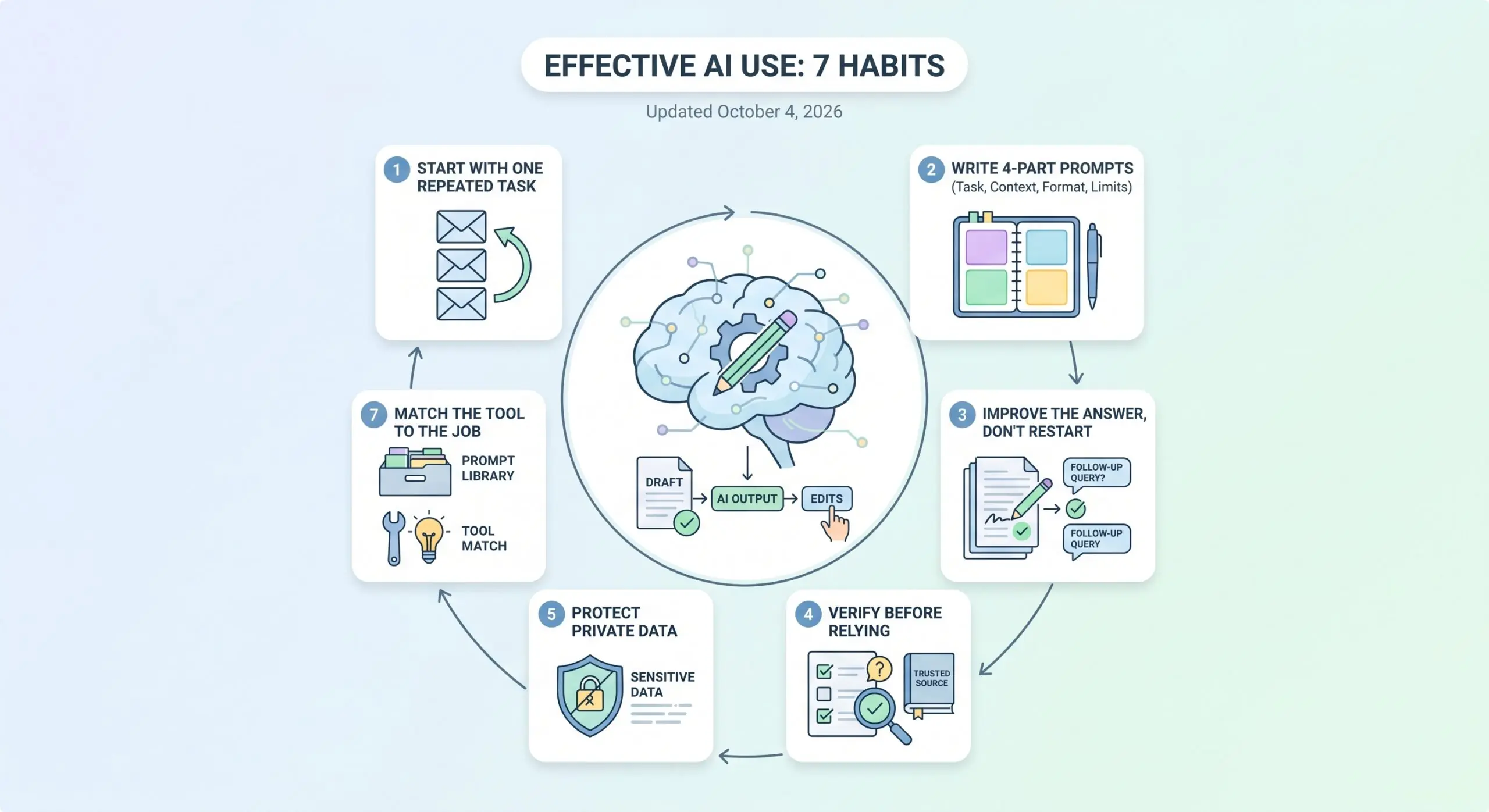
1. Start with one task you repeat
Table of Contents
Do not try to “use AI for everything.” Choose one job you do weekly, such as replying to routine emails, summarizing meeting notes or drafting a report outline, and get that one reliably good. A repeated task gives you something to compare against, so you can tell whether the AI actually saved time.
2. Write prompts with four parts
OpenAI’s guidance for ChatGPT boils down to being clear and specific, giving enough context, refining the result step by step, and naming the tone you want. Anthropic’s prompting documentation points the same way, adding examples and structure. A simple way to remember it:
- Task: what you want done.
- Context: who it is for and what the AI needs to know.
- Format: the shape of the answer, such as a table or five bullet points.
- Limits: length, tone and what to avoid.
Compare these two requests.
Weak: Write an email about the delay.
Better: Write a 120-word email to a customer whose order is five days late because of a supplier problem. Apologize once, give the new delivery date of October 14, offer a 10% discount code, and keep the tone calm and professional. Do not blame the supplier by name.
The second prompt takes thirty seconds longer to write and usually saves several rounds of fixing. For more examples, see our guide on how to write ChatGPT prompts.
3. Improve the answer instead of starting over
The first response is a draft. Reply with specific edits: shorten it, make it warmer, add a comparison table, explain step three more simply. Asking the AI to critique its own answer, or to list what it assumed, also exposes weak spots quickly. Treat the conversation as editing, not as a vending machine.
4. Verify before you rely on it
AI tools can state wrong facts with complete confidence. This is called hallucination, and it happens because the model predicts likely words rather than looking facts up. A few habits cut the risk:
- Give the tool the real material, such as your notes or an article, so it works from your facts instead of inventing them.
- Tell it to say “I don’t know” when it is unsure, and to flag any figure it cannot source.
- Check prices, dates, laws, medical details and statistics against an official website.
- For anything high stakes, ask the same question in a second tool and compare.
A simple rule: the more costly a mistake would be, the less you should trust an unchecked answer.
5. Protect private data
What you type may be stored or used to improve the service, depending on the tool and your settings. As a rule of thumb, do not paste personal data, passwords, contracts under NDA, unreleased financial results or customer lists into a public chatbot. Replace real names and numbers with placeholders when you only need help with structure. At work, use the company-approved account, because business plans often come with stronger data terms than free ones. Check each tool’s privacy settings, since they differ.
6. Match the tool to the job
Popularity is not quality, but it shows what people actually use. In Pew’s survey, 44% of US adults had used ChatGPT, 24% Gemini, 17% Copilot, 14% Meta AI and 6% Claude. Most tools handle drafting and summarizing well. Differences show up in areas such as live web access, handling long documents, working with files and integration with apps you already use. Try the same real task in two tools for a week and keep the one that needs fewer corrections.
7. Build a small prompt library
When a prompt works, save it with a note on what to change next time. Over a month you will have a handful of reliable templates for emails, summaries and reports. This is also the kind of habit employers now look for when they hire for AI skills.
10 everyday uses of AI that actually help
- Summarize a long article or report into five bullet points.
- Draft a reply to a routine email, then edit it in your own voice.
- Explain a hard idea at the level of a beginner, then ask follow-up questions.
- Turn messy notes into a clear to-do list.
- Compare two products or options in a table with pros and cons.
- Brainstorm names, slogans or gift ideas.
- Plan a trip or a weekly meal plan around your constraints.
- Practice for an interview by having the AI ask you questions.
- Proofread writing and suggest clearer wording.
- Analyze a spreadsheet by describing what you want to know, then check the numbers yourself.
How to use AI properly as a student
Check your school’s rules first, because they vary by course. Good uses are asking for explanations, generating practice questions, getting feedback on a draft you wrote and organizing a study plan. Submitting AI-written work as your own is the main thing to avoid, and fabricated citations are a common trap, so verify every source it gives you. Google also publishes an AI for Students page.
Where to learn AI tools
- Google AI Essentials: under five hours, five modules, no experience needed. It is not free: in the US and Canada it costs $49 a month after a seven-day trial, and many learners finish within a month.
- Elements of AI: a free course from the University of Helsinki and MinnaLearn that explains what AI can and cannot do, with no programming or complicated math. More than 2 million people have signed up.
- The free prompting guides from OpenAI and Anthropic, which are short and practical.
If you run a business, pair this with our picks for the best AI productivity tools for small business.
Frequently Asked Questions
How do I use AI for beginners?
Open one chatbot and give it a real task, such as summarizing something you need to read. Write the request with a goal, some context, the format you want and any limits. Then ask for changes until it is right, and check any facts before you use them.
Can I learn how to use AI tools for free?
Yes. Elements of AI is free, and OpenAI and Anthropic publish free prompting guides. Most chatbots also have free tiers you can practice on. Google AI Essentials is paid after its seven-day trial in the US and Canada.
How do I use AI properly for students?
Follow your school’s policy, use AI to understand material and practice rather than to write finished work, and verify every fact and citation it gives you. Be ready to explain anything you submit in your own words.
What are 10 uses of artificial intelligence in daily life?
Common uses include summarizing text, drafting emails, explaining difficult ideas, organizing notes, comparing options, brainstorming, planning trips and meals, interview practice, proofreading and spreadsheet analysis. The full list with examples is above.
Is it safe to share personal information with AI tools?
Avoid it. Do not paste passwords, financial details, medical records or confidential work documents into a public chatbot. If you need help with sensitive material, replace real names and figures with placeholders first, and review the tool’s privacy settings.