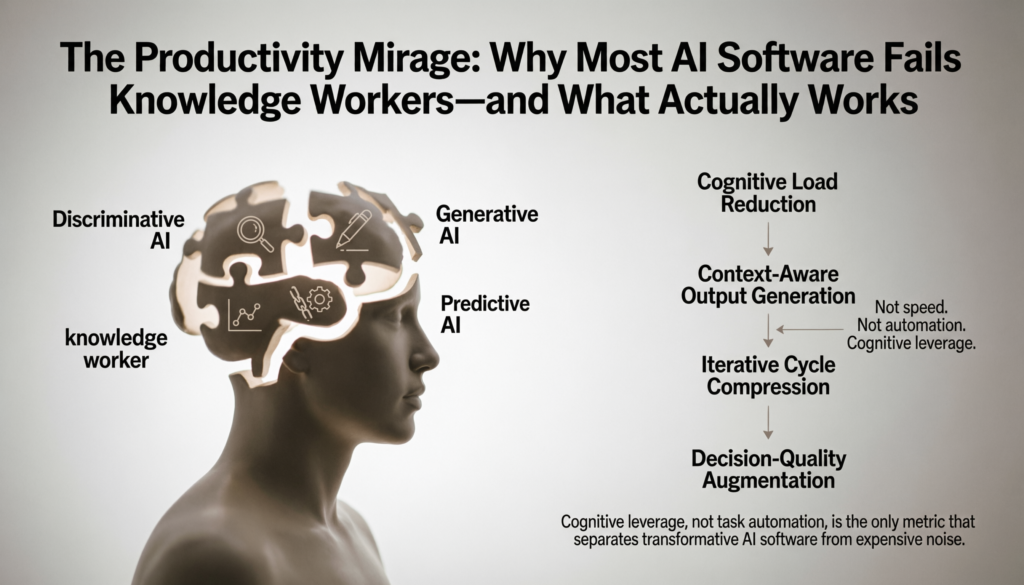
The Productivity Mirage: Why Most AI Software Fails Knowledge Workers—and What Actually Works
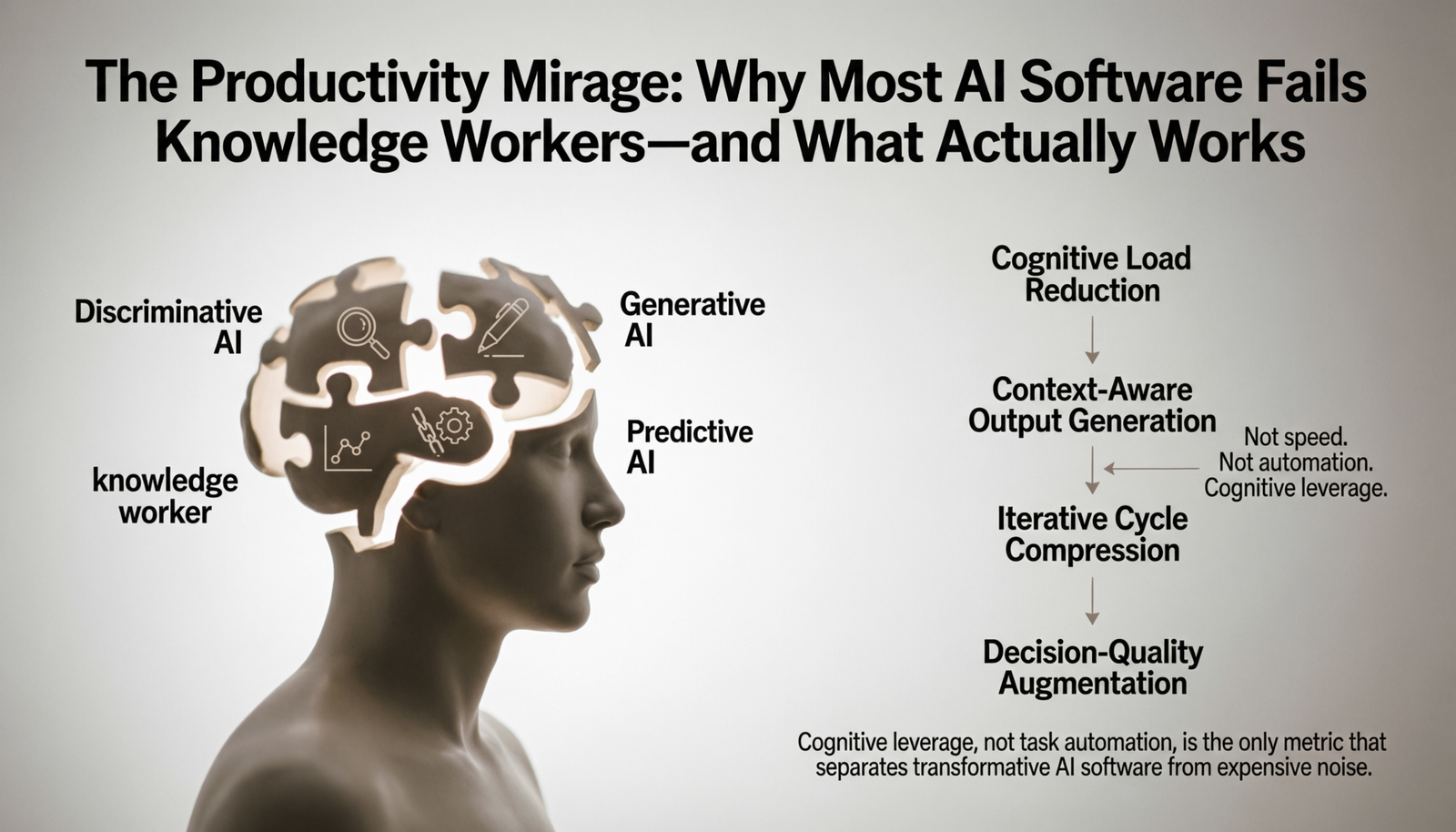
Cognitive leverage, not task automation, is the only metric that separates transformative AI software from expensive noise.
The modern knowledge worker does not have a time problem. They have a cognitive load problem. Calendars are full, inboxes breathe on their own, and the outputs compound—yet the feeling of meaningful progress recedes. When AI productivity software entered mainstream adoption, the promise was unambiguous: automate the friction, reclaim the hours. Two years into broad deployment, the evidence is more complicated.
Not because the tools fail technically. Many perform exactly as marketed. The problem is architectural: most organizations deploy AI tools the same way they deployed earlier SaaS software—as isolated point solutions layered over unchanged workflows. The result is productivity theater. Tools multiply, switching costs rise, and the cognitive overhead of managing the tools begins to rival the cognitive overhead they were meant to reduce.
This analysis examines the structural realities of AI software designed to increase productivity—not as a product review, but as a systemic critique of how these tools are built, deployed, and misunderstood.
What Is an AI Tool for Increasing Productivity?
The category is widely misused. Popular discourse conflates three distinct categories under a single label, which distorts both expectations and purchasing decisions.
The first category is automation software with AI features—tools like Zapier, Make, or Microsoft Power Automate that use machine learning to suggest workflow rules or parse unstructured input, but whose core value is deterministic process execution. They reduce repetition; they do not augment cognition.
The second category is AI-native productivity software—tools architected from the ground up around language models or generative AI, where the intelligence layer is not decorative but structural. Notion AI, GitHub Copilot, and Otter.ai fall here. The quality of output is directly tied to how well the model integrates with the user’s existing context.
The third category is AI agents and autonomous systems—software that can initiate multi-step tasks without step-by-step human instruction. This includes early-stage systems like Devin, AutoGPT derivatives, and enterprise orchestration platforms. These remain the least mature category commercially, despite receiving disproportionate media attention.
An AI tool for increasing productivity, defined precisely, is software that reduces the cognitive or mechanical cost of producing high-quality work outputs—through either offloading execution, augmenting decision quality, or compressing the iteration cycles between idea and artifact.
This definition has an important implication: speed is not productivity. A tool that generates a mediocre first draft in two seconds may cost more total time than writing the draft slowly if revision cycles are long. Evaluation must account for the full workflow, not just the point of AI intervention.
What Are the Four Types of AI Software?
AI software is not a monolith. A useful analytical taxonomy divides it into four functional categories, each with distinct architectures, failure modes, and appropriate use cases.
Discriminative AI models learn to classify or predict based on labeled training data. Spam filters, fraud detection engines, and resume-screening software operate on this paradigm. In productivity contexts, these systems surface signal from noise—flagging critical emails, categorizing expenses, prioritizing support tickets. Their limitation is brittleness: they fail gracefully only within distribution of training data.
Generative AI models produce novel outputs—text, code, images, audio—by learning underlying data distributions. This is the category that captured mass attention in 2023–2024. GPT-4, Claude, Gemini, and their derivatives operate here. In productivity workflows, generative AI compresses the production of first drafts, code scaffolding, and structured summaries. Its failure mode is hallucination and stylistic uniformity—outputs that are fluent but factually unsound or contextually flat.
Predictive AI uses historical patterns to forecast future states. Sales forecasting engines, churn models, and resource allocation systems belong here. These tools shift productivity from reactive to anticipatory—enabling decisions before signals become crises. Their limitation is data dependency: predictive quality degrades sharply when historical patterns break, which they routinely do in volatile markets.
Agentic AI systems execute multi-step tasks with limited human supervision. Unlike the above categories, which respond to queries, agentic systems initiate. They browse, write, call APIs, synthesize results, and surface outputs. Commercial examples are still maturing—Copilot in Microsoft 365, Salesforce Agentforce, and experimental developer agents like Devin operate at the frontier of this category. Their current limitation is reliability at scale: agentic systems compound errors across steps, and the failure modes are harder to audit than single-step outputs.
Understanding which category a tool belongs to determines appropriate evaluation criteria. Applying the reliability standards of discriminative systems to generative outputs, for instance, is the origin of much organizational frustration with AI tools.
What Is the Best AI Tool for Increasing Productivity?
There is no correct answer to this question in the abstract—and the frequency with which it is asked reveals the core misconception: that AI productivity software functions like a universal solvent.
The more analytically precise question is: best for which cognitive work type, at which workflow stage, in which organizational context?
For individual knowledge workers managing unstructured information, Notion AI and Obsidian with AI plugins deliver meaningful leverage. They reduce the time between raw capture and structured artifact—meeting notes become action items, scattered thoughts become organized documents. The constraint is that quality scales with input quality. A tool that summarizes meetings can only be as precise as the transcription feeding it.
For developers, GitHub Copilot remains the most rigorously validated AI tool for increasing productivity. A 2023 study published by GitHub’s research team found that developers using Copilot completed tasks 55% faster on average—a finding that has held up in independent replications, with the important caveat that the productivity gain is concentrated in boilerplate-heavy tasks, not architectural decision-making. Cursor IDE, which integrates Claude and GPT-4 with a codebase-aware context window, extends this to refactoring and multi-file edits.
For business analysts and strategists, the highest-leverage AI tools are those integrating with existing data infrastructure. ChatGPT’s Advanced Data Analysis, Perplexity for research synthesis, and purpose-built tools like Gong for call intelligence allow analysts to compress the cycle from raw data to structured insight. The limitation here is interpretive: AI surfaces patterns; judgment about which patterns matter remains human.
For executives and founders, AI tools and software deliver highest value at the decision-support layer—synthesizing competitive intelligence, drafting scenario analyses, and compressing reading loads. The risk is epistemic: decision-makers who over-rely on AI-synthesized summaries begin operating on compressed versions of reality, losing the texture that informs good judgment.
The most defensible answer to “best tool” is the one with the shortest path to the user’s most cognitively expensive bottleneck—not the one with the most features.
AI Software for Boosting Productivity in Enterprise Environments
Enterprise deployment of AI productivity software introduces variables that individual-use assessments systematically underweight.
The first is integration cost. A tool that performs impressively in isolation often degrades when connected to legacy ERP systems, proprietary data warehouses, and internal knowledge bases structured for human navigation rather than machine parsing. Microsoft Copilot for Microsoft 365, for instance, offers meaningful automation potential in environments where organizational knowledge lives natively in SharePoint and Teams. In organizations where critical institutional knowledge exists in PDFs, physical files, or informal verbal culture, the same tool delivers a fraction of its advertised value.
The second is change management friction. AI tools and software do not replace workflows—they displace them. Every displacement requires retraining, habit formation, and tolerance for a temporary productivity dip during adoption. Organizations that deploy AI tools without modeling adoption curves routinely misattribute the dip to tool failure, abandoning implementations before value accrues.
The third is data governance complexity. Enterprise AI productivity tools operate on organizational data—email, documents, communications, financial records. This creates immediate tensions with data residency requirements, GDPR and CCPA obligations, and internal security classifications. Enterprises that treat these as procurement concerns rather than architectural constraints create latent liability.
The practical implication is that enterprise AI productivity ROI is not primarily a function of tool quality. It is a function of organizational readiness: the quality of existing data infrastructure, the clarity of use-case prioritization, and the maturity of governance frameworks.
AI for Boosting Productivity for Developers Versus Business Managers
These two user archetypes interact with AI software in structurally different ways, and conflating them produces poor tooling decisions.
Developers operate in high-feedback, low-ambiguity environments. Code either compiles or it does not. Functions either pass tests or they fail. This makes AI-generated outputs immediately verifiable—which dramatically reduces the risk of acting on low-quality AI output. GitHub Copilot, Cursor, and Tabnine function as statistical autocomplete with deep syntactic awareness. The productivity gain is real, measurable, and relatively low-risk.
Business managers operate in low-feedback, high-ambiguity environments. A strategy memo looks convincing whether it is analytically sound or not. A market summary generated by a language model reads fluently regardless of whether the underlying synthesis is accurate. This means the validation burden falls entirely on the human—and the AI’s fluency can actively suppress that validation instinct. Managers who over-trust AI-generated analyses are exposed to a failure mode with no equivalent in developer workflows.
This asymmetry has a concrete implication for tool design. Developer AI tools benefit from speed and suggestion-density. Business management AI tools benefit from confidence calibration—explicit acknowledgment of uncertainty, citation of sources, and structural prompts for critical review. Tools that do not build this in are optimizing for the wrong outcome in managerial contexts.
Structural Limitations of AI Tools and Software
The productivity gains attributed to AI software are real but bounded—and the bounds are systematically underreported.
Context window constraints remain a fundamental architectural limitation. Language models process text within fixed-length windows. For an analyst working across a 500-page research corpus, a multi-year email thread, or a sprawling codebase, the model cannot hold the full context simultaneously. It summarizes, and summaries lose information. Tools that advertise long context windows (128K, 200K tokens) mitigate but do not eliminate this problem—performance degrades at the extremes of the window.
Temporal knowledge decay affects any AI tool trained on a fixed dataset. Models do not know what happened after their training cutoff. In fast-moving domains—regulatory environments, competitive landscapes, technology markets—this renders AI-synthesized analysis unreliable without retrieval-augmented grounding in current data. Tools without live retrieval (web search, document ingestion, API connections to live databases) should be treated as sophisticated historical reference tools, not current intelligence systems.
Calibration failure is the subtlest and most costly limitation. Language models are trained to produce coherent, confident-sounding text. They are not natively calibrated to signal uncertainty proportional to actual uncertainty. This produces outputs that feel authoritative when they are not—a particularly dangerous failure mode in analytical and strategic contexts where the downstream cost of confident errors is high.
Skill atrophy is an underacknowledged second-order effect. Knowledge workers who delegate drafting, analysis, and synthesis to AI tools may gradually lose the underlying competencies those activities develop. The productivity gain is real in the short term; the strategic cost accumulates invisibly.
The Shift Towards Autonomous Productivity Systems
The most significant structural change underway in AI productivity software is not incremental capability improvement—it is the transition from reactive tools to autonomous agents.
Current AI productivity software is reactive: the human initiates, the AI responds. Autonomous systems invert this architecture. They monitor triggers, initiate actions, and surface results without continuous human prompting. Microsoft’s Copilot agents, Salesforce Agentforce, and experimental systems from startups like Lindy and Relay.app represent early commercial expressions of this model.
The productivity ceiling of reactive tools is the human’s ability to formulate high-quality prompts consistently. Autonomous systems eliminate this constraint—but introduce a new one: alignment between the agent’s action logic and the organization’s actual priorities. Agents that optimize for measurable proxies (emails sent, tasks closed, reports generated) can diverge from the unmeasurable goals they are meant to serve (relationship quality, decision quality, strategic coherence).
The most analytically honest framing of autonomous AI productivity systems at their current maturity level: they are most valuable in high-volume, low-variance workflows—scheduling, data entry, routine reporting, triage. They remain unreliable in low-volume, high-variance work where judgment is the primary value driver.
Risks of Strategic Integration
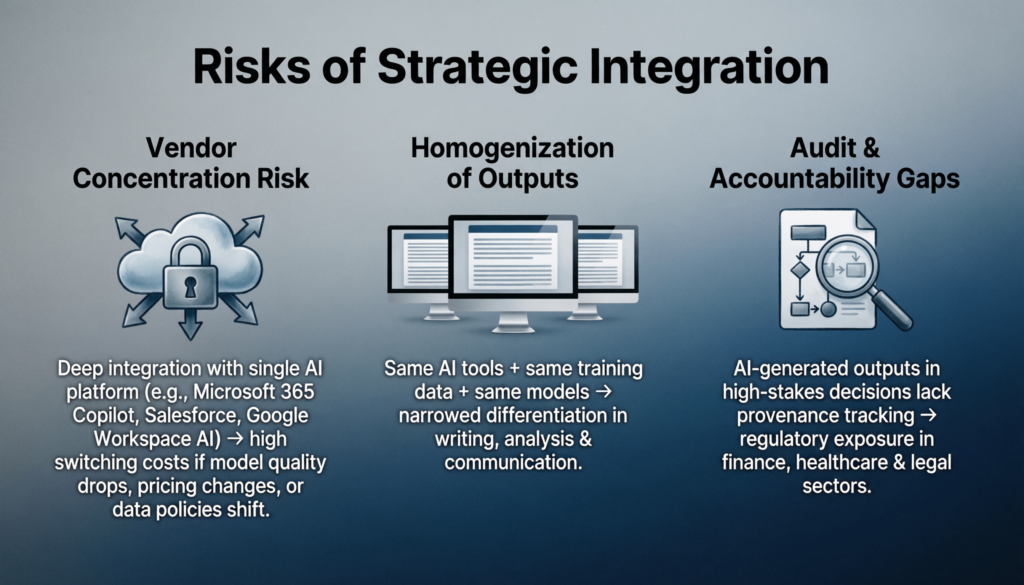
Organizations integrating AI software to increase productivity at scale incur risks that point-solution evaluations do not surface.
Vendor concentration risk is material. Organizations deeply integrated with a single AI productivity platform—Microsoft 365 Copilot, Salesforce, Google Workspace AI—face significant switching costs if that vendor’s model quality deteriorates, pricing changes substantially, or the platform makes data policy changes. The integration that creates value also creates lock-in.
Homogenization of outputs is a subtler competitive risk. If competing organizations use the same AI tools, trained on the same datasets, generating outputs from the same underlying models, the differentiation in work product quality narrows. AI software to increase productivity, at scale, may compress competitive advantage in writing, analysis, and communication—the domains where knowledge work differentiation historically lives.
Audit and accountability gaps emerge when AI-generated outputs feed consequential decisions without clear provenance tracking. Regulatory environments in financial services, healthcare, and legal contexts are developing requirements around AI decision transparency—organizations that have not built provenance infrastructure into their AI workflows face retroactive compliance exposure.
Read also
Artificial intelligence tools and software
Expert Summary
The consensus emerging from practitioners who have moved past early adoption is cautiously precise.
Ethan Mollick, Wharton professor and one of the most rigorous empirical observers of AI productivity dynamics, has consistently argued that the productivity gains from AI tools are real and significant—but that the gap between high-skill and low-skill AI users is widening, not narrowing. The tool does not equalize; it amplifies existing capability.
Andrew Ng’s framing remains analytically useful: AI is the new electricity. Not a product, not a feature—a general-purpose capability that requires new infrastructure to deliver value. Organizations that have not built that infrastructure will deploy AI tools without capturing AI productivity gains.
The synthesis is this: AI software to increase productivity is neither the productivity revolution it is marketed as nor the threat it is feared to be. It is a capability multiplier with bounded, context-dependent effects, structural limitations that require organizational design to mitigate, and a total cost of integration substantially higher than the subscription cost advertised.
Organizations that approach it analytically—mapping specific cognitive bottlenecks, selecting tools by workflow fit rather than feature breadth, building validation cultures that compensate for AI overconfidence, and monitoring for second-order effects like skill atrophy and output homogenization—will capture meaningful, durable productivity gains.
Organizations that deploy it as a signal of modernization, without the organizational infrastructure to absorb it, will pay the subscription and report the productivity theater.
Frequently Asked Questions
Which is the best AI tool for productivity?
There is no universal answer. The highest-performing AI productivity tool is the one aligned with the user’s most cognitively expensive bottleneck. For developers, GitHub Copilot and Cursor have the strongest empirical validation. For analysts, ChatGPT Advanced Data Analysis and Perplexity deliver measurable research compression. For general knowledge workers managing information at scale, Notion AI and Microsoft Copilot (in organizations with native M365 infrastructure) offer the best integration density. The evaluation framework matters more than the tool ranking: identify the workflow stage where cognitive cost is highest, and select the tool with the shortest path to reducing it.
What is an AI productivity tool?
An AI productivity tool is software that reduces the cognitive or mechanical cost of producing high-quality work outputs through one of three mechanisms: automating execution of defined tasks, augmenting the quality of human decisions through pattern recognition or synthesis, or compressing iteration cycles between idea and finished artifact. The category includes automation software with AI features, AI-native productivity software built around language models, and emerging agentic systems capable of multi-step autonomous execution. These categories have distinct architectures, failure modes, and appropriate deployment contexts—conflating them is the source of most organizational disappointment with AI productivity investments.