
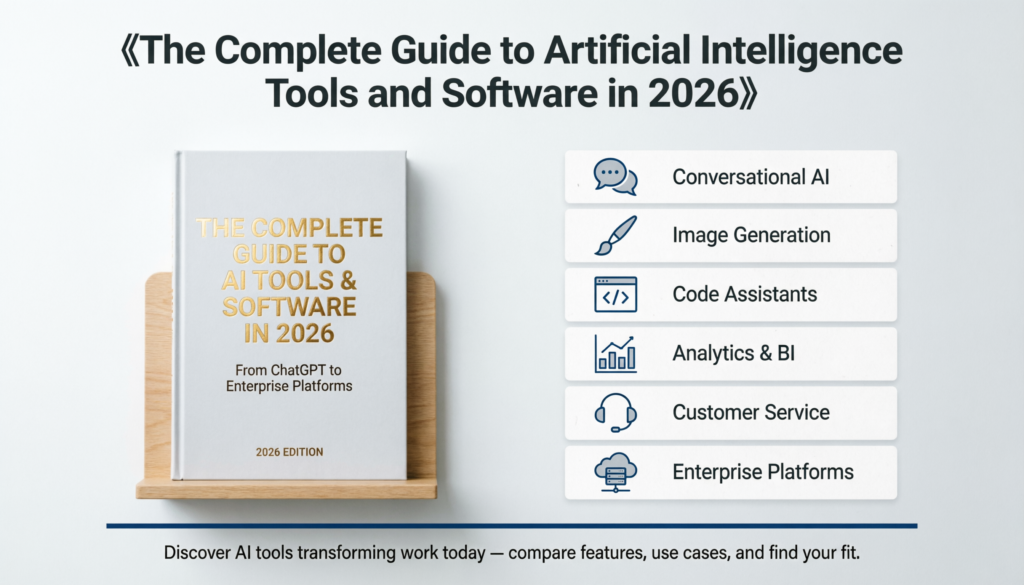
The Complete Guide to Artificial Intelligence Tools and Software in 2026
Meta Description: Discover AI tools and software transforming work today—from ChatGPT to enterprise platforms. Compare features, use cases, and find the right solution for your needs.
Introduction
Artificial intelligence tools have moved from experimental tech to daily essentials. Businesses use them to automate workflows, creators rely on them for content generation, and developers build with them to ship products faster.
The AI software landscape now spans hundreds of solutions across different categories. Some handle conversation and writing, others process images or analyze data. Understanding which tools solve which problems helps you choose effectively without wasting time on features you don’t need.
Quick Answer: What Are AI Tools and Software?
AI tools and software are applications powered by machine learning models that automate tasks requiring human-like intelligence. These include language models (ChatGPT, Claude), image generators (Midjourney, DALL-E), code assistants (GitHub Copilot), analytics platforms (Tableau AI), and enterprise automation systems that handle everything from customer service to supply chain optimization.
What Are the Software Tools for Artificial Intelligence?
AI software tools fall into distinct categories based on their core function. Each category serves specific use cases, though many modern platforms now combine multiple capabilities.
Conversational AI and Language Models
These tools process and generate human language for writing, analysis, and conversation.
- ChatGPT (OpenAI): General-purpose chatbot for writing, research, brainstorming, and coding help
- Claude (Anthropic): Long-context AI assistant specialized in analysis, document processing, and complex reasoning
- Gemini (Google): Multimodal AI integrated with Google Workspace and Search
- Microsoft Copilot: Enterprise-focused AI embedded in Office 365 and Windows
Language models excel at drafting emails, summarizing documents, explaining concepts, and generating first drafts. They struggle with real-time information unless connected to search tools.
Image Generation and Visual AI
Creative professionals and marketers use these for visual content creation.
- Midjourney: High-quality artistic images from text descriptions
- DALL-E 3: OpenAI’s image generator integrated into ChatGPT
- Stable Diffusion: Open-source image generation with full customization control
- Adobe Firefly: Commercial-safe AI art for professional design workflows
Visual AI works best for concept exploration, mockups, and social media content. It’s not yet reliable for detailed technical diagrams or perfectly accurate representations.
Code Development Assistants
Developers use AI coding tools to write, debug, and review code faster.
- GitHub Copilot: Real-time code suggestions inside your IDE
- Cursor: AI-first code editor with chat and edit capabilities
- Replit AI: Browser-based coding with built-in AI assistance
- Amazon CodeWhisperer: AWS-optimized code generation
Code assistants handle boilerplate code, function completion, and debugging suggestions. Senior developers use them to accelerate routine tasks while maintaining oversight on logic and architecture.
Business Intelligence and Analytics
These platforms turn raw data into insights without requiring SQL expertise.
- Tableau AI: Natural language queries for data visualization
- Power BI Copilot: Microsoft’s AI layer for business analytics
- ThoughtSpot: Search-driven analytics platform
- Polymer: Spreadsheet data transformed into visual dashboards
AI analytics tools reduce the technical barrier to data exploration. They work best when combined with human judgment about which questions matter.
Customer Service Automation
Support teams deploy these to handle high-volume inquiries.
- Zendesk AI: Automated ticket routing and response suggestions
- Intercom Fin: AI chatbot trained on your support documentation
- Ada: No-code customer service automation
- Kustomer: AI-powered omnichannel support platform
Customer service AI handles tier-1 questions effectively but should escalate complex issues to humans. Implementation quality depends heavily on how well you train it on your specific products.
Marketing and Content Creation
Content teams use these for ideation, writing, and optimization.
- Jasper: Long-form marketing copy and campaign content
- Copy.ai: Short-form social media and ad copy
- Surfer SEO: AI content optimization based on search ranking factors
- Grammarly: Writing enhancement and tone adjustment
Marketing AI accelerates first drafts but requires human editing for brand voice, accuracy, and strategic positioning. The best results come from using these as collaboration tools, not replacement writers.
Video and Audio Processing
Media creators leverage AI for editing, transcription, and generation.
- Descript: Video editing through text transcript manipulation
- Runway: AI video effects and generation tools
- ElevenLabs: Text-to-speech with voice cloning
- Otter.ai: Meeting transcription and summarization
Audio/video AI dramatically reduces editing time. Transcription accuracy now exceeds 95% for clear audio, making these tools reliable for professional use.
Enterprise AI Platforms
Large organizations use comprehensive platforms that integrate multiple AI capabilities.
- Salesforce Einstein: CRM with predictive analytics and automation
- IBM Watson: Enterprise AI for healthcare, finance, and operations
- Google Cloud AI: Infrastructure and pre-trained models for custom development
- Azure AI Services: Microsoft’s suite of AI APIs and tools
Enterprise platforms require significant implementation effort but offer deeper customization and integration with existing systems.
What Are the Tools of Artificial Intelligence?
Beyond end-user applications, AI development relies on frameworks, libraries, and infrastructure tools that developers and data scientists use to build custom solutions.
Machine Learning Frameworks
- TensorFlow: Google’s open-source ML framework for production systems
- PyTorch: Facebook’s framework preferred for research and experimentation
- Scikit-learn: Python library for classical machine learning algorithms
- Keras: High-level neural network API running on TensorFlow
These frameworks let teams build custom models for specialized use cases that off-the-shelf tools can’t address.
- Apache Spark: Distributed data processing for large datasets
- Snowflake: Cloud data warehouse with AI integration
- Databricks: Unified analytics platform combining data engineering and ML
- MLflow: Open-source platform for managing ML experiments and deployment
Data infrastructure determines whether your AI projects succeed or fail. These tools handle the messy reality of cleaning, storing, and versioning training data.
Model Training and Deployment
- Weights & Biases: Experiment tracking and model performance monitoring
- Hugging Face: Repository of pre-trained models and deployment tools
- Amazon SageMaker: End-to-end ML development and hosting
- Vertex AI: Google’s managed ML platform
Training tools reduce the gap between experimental notebooks and production systems. They track which model versions perform best and automate deployment pipelines.
Vector Databases and Retrieval
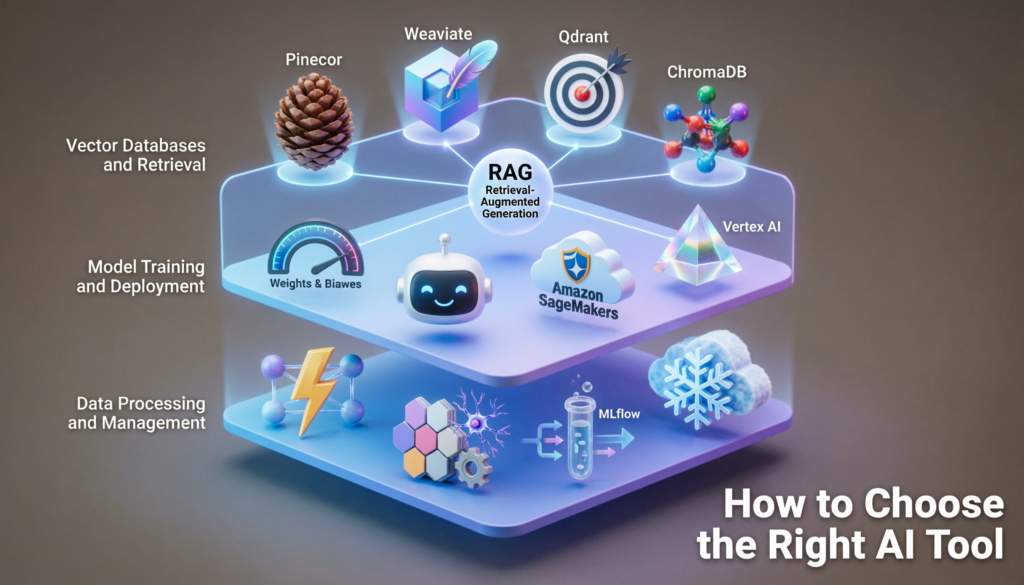
- Pinecone: Managed vector database for semantic search
- Weaviate: Open-source vector database with built-in ML
- Qdrant: High-performance vector similarity engine
- ChromaDB: Lightweight embedding database for AI applications
Vector databases power retrieval-augmented generation (RAG), letting AI tools access your specific documents and data when answering questions.
How to Choose the Right AI Tool
Selection depends on three factors: your specific use case, technical requirements, and budget constraints.
Match Tool to Task
Don’t use general-purpose AI when specialized tools exist. Need to edit video? Use Descript, not ChatGPT with plugins. Building a customer chatbot? Start with Intercom Fin before developing custom solutions.
Specialized tools deliver better results because they’re optimized for specific workflows and output formats.
Evaluate Integration Requirements
The best AI tool is worthless if it doesn’t connect to your existing systems. Check for:
- Native integrations with your CRM, project management, or design tools
- API access if you need custom connections
- Export formats that match your workflow
- Single sign-on (SSO) for enterprise deployments
Integration friction kills adoption faster than missing features.
Consider Total Cost Beyond Subscription
AI tool pricing varies dramatically:
- Free tiers: Good for experimentation, limited for production use
- Per-seat subscriptions: $20-100/month per user
- Usage-based: Pay per API call, token, or generation
- Enterprise licensing: Custom pricing based on volume and features
Factor in training time, API costs if you’re building custom integrations, and potential productivity gains. A $100/month tool that saves 10 hours weekly delivers massive ROI.
Test Before Committing
Most AI platforms offer free trials. Use them to:
- Run real tasks from your workflow, not demo scenarios
- Measure output quality against your standards
- Test edge cases and failure modes
- Evaluate how long it takes team members to become productive
Two weeks of hands-on testing reveals more than feature comparison charts.
Practical Use Cases Across Industries
Software Development
Development teams use AI to reduce time spent on repetitive tasks. GitHub Copilot autocompletes functions based on context, while Claude or ChatGPT help debug error messages and explain unfamiliar codebases.
QA teams leverage AI to generate test cases. Instead of manually writing hundreds of unit tests, developers describe the function and let AI suggest edge cases and input variations.
Marketing and Sales
Marketing teams use AI for audience research, content ideation, and ad copy testing. Tools like Jasper generate multiple headline variations in seconds, which teams then refine based on brand guidelines.
Sales organizations deploy AI to summarize call transcripts, draft follow-up emails, and analyze deal patterns. Salesforce Einstein surfaces which opportunities are most likely to close based on historical data.
Healthcare and Medical
Medical practices use AI transcription to convert patient conversations into structured clinical notes. This reduces documentation time from 2 hours per day to minutes.
Radiology departments leverage AI to flag potential anomalies in imaging scans, helping radiologists prioritize urgent cases. The AI doesn’t make diagnoses but improves workflow efficiency.
Legal and Professional Services
Law firms use AI for contract review, legal research, and document summarization. Instead of paralegals spending days reviewing discovery documents, AI tools highlight relevant clauses and potential issues for attorney review.
Consulting firms leverage AI to analyze client data, generate presentation decks, and research industry trends. This shifts consultant time from information gathering to strategic analysis.
Education and Training
Educators use AI to generate quiz questions, provide personalized feedback on student writing, and create lesson plan variations for different learning levels.
Corporate training departments deploy AI tutors that answer employee questions about company policies, software tools, and procedures. This reduces the load on HR and IT help desks.
Common Implementation Challenges
Data Privacy and Security
Enterprise AI adoption stalls when data governance policies aren’t clear. Many tools process data on external servers, creating compliance risks for regulated industries.
Solutions include:
- Using AI tools with SOC 2 certification and GDPR compliance
- Deploying self-hosted models for sensitive data
- Implementing data retention policies that auto-delete after processing
- Training employees on what data types can be shared with AI tools
Output Quality and Hallucinations
AI models sometimes generate plausible-sounding but factually incorrect information. This is particularly problematic in legal, medical, and technical contexts.
Mitigation strategies:
- Always verify AI-generated facts against authoritative sources
- Use retrieval-augmented generation (RAG) to ground responses in your documents
- Implement human review workflows for high-stakes outputs
- Train teams to recognize when AI is speculating versus citing sources
Change Management and Adoption
The most advanced AI tool fails if employees don’t use it. Common adoption barriers include:
- Fear of job displacement
- Lack of training on effective prompting techniques
- Unclear guidance on when to use AI versus traditional methods
- Poor integration into existing workflows
Successful rollouts include hands-on training, internal champions who share best practices, and clear policies on appropriate use.
Future Trends in AI Tools
Multimodal Integration
Tools increasingly combine text, image, audio, and video processing in single platforms. Gemini and GPT-4V already analyze images and generate text simultaneously. Expect this to become standard across all AI categories.
Autonomous Agents
Current AI tools respond to individual prompts. Emerging agent frameworks like AutoGPT and AgentGPT can plan multi-step tasks, use tools independently, and iterate toward goals with minimal human guidance.
These will handle complex workflows like “research competitors, draft positioning document, create presentation slides” from a single instruction.
Industry-Specific Models
Generic AI models are being replaced by specialized versions trained on domain-specific data. Medical AI trained on clinical literature outperforms general models for healthcare tasks.
Expect purpose-built AI for finance, legal, manufacturing, and other verticals with unique terminology and compliance requirements.
Local and Edge Deployment
Privacy concerns and latency requirements are driving AI toward local processing. Tools like LM Studio let you run language models on your laptop. This trend accelerates as hardware improves and models become more efficient.
Frequently Asked Questions
What are the software tools for artificial intelligence?
AI software tools include language models like ChatGPT and Claude for text generation, image creators like Midjourney and DALL-E, code assistants like GitHub Copilot, business intelligence platforms like Tableau AI, customer service bots like Intercom Fin, and enterprise systems like Salesforce Einstein. Each category addresses specific tasks such as content creation, data analysis, automation, or customer support.
What are the tools of artificial intelligence?
The tools of artificial intelligence include development frameworks (TensorFlow, PyTorch), machine learning platforms (SageMaker, Vertex AI), data processing systems (Apache Spark, Databricks), vector databases (Pinecone, Weaviate), and model deployment infrastructure. These foundational tools enable developers and data scientists to build, train, and deploy custom AI models rather than using pre-built applications.
Which AI tool is best for beginners?
ChatGPT or Claude are the best starting points for beginners because they require no technical setup or coding knowledge. Both offer free tiers, work through simple text conversations, and handle diverse tasks like writing, research, and learning new topics. Their chat interface makes AI accessible without learning specialized software or prompting techniques.
Can AI tools replace human workers?
AI tools augment human capabilities rather than replace workers entirely. They excel at automating repetitive tasks, generating first drafts, and processing large data volumes, but they lack judgment, creativity, and contextual understanding for complex decisions. Most effective implementations use AI to handle routine work while humans focus on strategy, relationship building, and nuanced problem-solving.
How much do professional AI tools cost?
Professional AI tools typically cost $20-100 per user monthly for business plans. Entry-level subscriptions like ChatGPT Plus cost $20/month, while specialized tools like Jasper or Surfer SEO range from $49-99/month. Enterprise platforms with custom models, dedicated support, and advanced security features often start at $500-5,000 monthly depending on usage volume and features required.
Conclusion
AI tools have matured from experimental novelties to production-ready solutions across every business function. The key to successful adoption is matching specific tools to specific problems rather than expecting one platform to solve everything.
Start with clear use cases, test tools with real workflows, and implement proper governance around data privacy and output verification. The organizations seeing the biggest AI productivity gains treat these tools as collaborators that handle defined tasks while humans maintain oversight and strategic direction.
The AI landscape will continue evolving rapidly, but the fundamental principle remains constant: technology amplifies human capabilities when implemented thoughtfully, with clear goals and proper guardrails.